


Head's up, there could be affiliate links ahead!
Long before I even knew I had ADHD, I started creating little hacks to make my workday more bearable. These weren’t fancy productivity systems (that came later)… just tiny, compensatory tricks that helped me keep moving when I felt stuck.
Over time, these small adjustments started to add up. They gave me more control over my time and, just as important, more control over my energy. And that’s the heart of ADHD productivity at work: managing your brain’s limited resources in ways that feel doable and sustainable.
Today I want to share seven of my favorite ADHD work hacks — the ones that actually save me hours every week.
1. Time boxing beats the endless to do list
A long to do list is where tasks go to disappear. Time boxing brings them back to life.
I take my list and place each task on a specific day inside a calendar layout. Monday gets what must happen Monday. Tuesday gets Tuesday. I can see what is realistic. I can see the consequences of moving something. Most important, I get that delicious dopamine hit when I complete the item inside the day it belongs to.
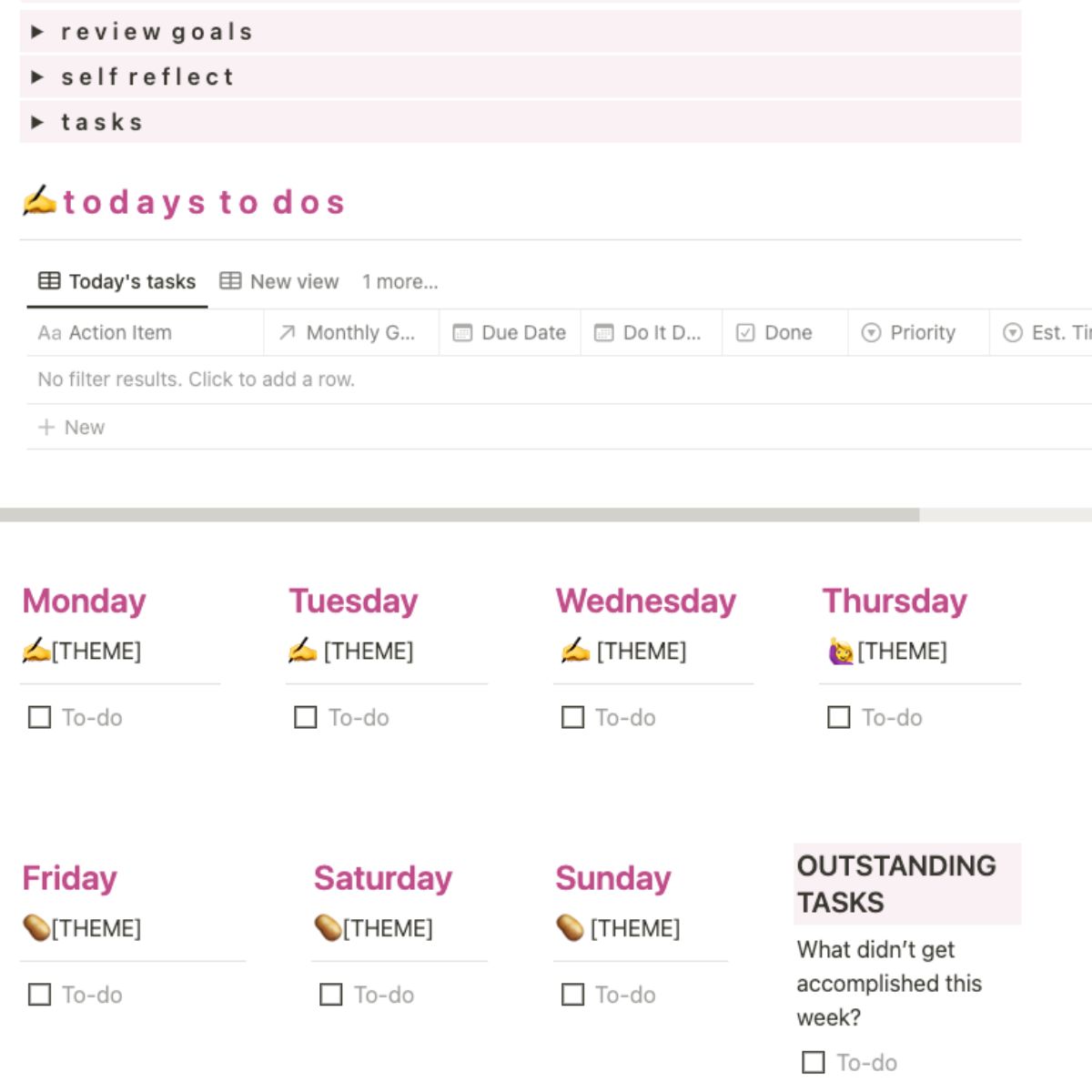
How to try it today
- Open your calendar view for the week (I love using Notion for this)
- Drop three concrete tasks into today, two into tomorrow, one into the next day
- Protect the time just like a meeting
2. Theme your days so decisions get lighter
Decision fatigue is real. The more often you must choose what to do next, the easier it is to freeze. Themed days remove that friction. Give each weekday a purpose so you wake up already knowing what matters.
Example themes
- Monday is admin and planning
- Tuesday is content creation
- Wednesday is meetings you cannot avoid
- Thursday is deep project work
- Friday is wrap up and catch up
Front load the important things early in the week. By Thursday and Friday only lower stakes items remain. Energy up. Stress down.
Tiny rule
If a task does not fit today’s theme, it moves to the day that owns it.
3. Outsource your “Meeting Memory” with AI
Here is the sponsored tool I am thrilled about because it helps ADHD brains in a very practical way. Granola is an AI notepad for meetings. It transcribes the conversation and lets you mark what is important while you are in the call. After the meeting, you can ask questions like, What did I promise my manager last month, and it will surface exactly what you need. No scrubbing through hour long transcripts. No panic when someone says, Did we decide that already.
A few notes I love
- It transcribes rather than records, like you taking notes but better
- It works across meeting platforms
- Good etiquette still applies, tell people you are transcribing and offer to share notes
This is the kind of tool that makes you look like the person who remembers everything. Because now you do.
4. Template everything and start in the middle
Templates are how I save time and cognitive energy. I have a template for video scripts, onboarding, sponsor workflow, presentations, the works. Everything lives in Notion so it is one click away when I need it.

The twist that changed everything for my ADHD brain is permission to start in the middle. Big presentations used to paralyze me because I did not have the perfect opening. With a structure in place I fill in the sections I know first. Middle. Ending. Then I circle back and write the intro last. Progress appears fast which keeps me going.
Template ideas to build once
- All hands presentation outline
- Recurring meeting agenda with action prompts
- Sponsor deliverable checklist
- Client onboarding checklist
- YouTube script framework with beats and calls to action
If you need a calm workspace to store templates, Notion is my favorite.
5. Talk it out, then let AI structure it
My ideas are rarely born in tidy sentences. They arrive as fragments. For years I forced myself to write them down and shape them by hand. Now I use voice input and let AI organize the mess. I open ChatGPT on my phone, hit the voice record button, and ramble for up to ten minutes. Then I ask it to turn my thoughts into an outline, a checklist, an email, or a script. I still edit. I still make it mine. I just skip the heavy lift of untangling my brain.
This works for
- Drafting tricky emails
- Outlining reports and proposals
- Capturing meeting debriefs while the details are fresh
- Brain dumping before creative work
6. The dopamine sandwich for dreaded tasks
Some work is simply boring. You still need to do it. Wrap it in a dopamine sandwich.
Build your sandwich
- Appetizer: a quick energizer that feels good
Coffee, a short walk, three minutes of music, a body doubling session with a friend or a FLOWN focus room - Main course: the task you are avoiding
Set a timer for twenty minutes and keep it contained - Dessert: a small reward you actually want
Ten minutes to scroll, a snack, a short chat, a stretch
Now the whole experience is sprinkled with motivation. The middle still is not fun, but it gets done.
7. Work in weird places to spark novelty
Novelty feeds dopamine. If your brain is starving, change the view. In an office, grab an empty conference room, the lobby, or a different floor. If you are at home, try a coffee shop, a quiet library, or even your patio. A fresh environment can lift attention just enough to get traction again. Pair this with time boxing and a dopamine sandwich for a powerful reset.
Low lift location ideas
- Meeting room during off hours
- Building lobby with a table
- Local library study nook
- Coffee shop for one focused hour
- Park bench with a hotspot for a quick admin block
More Tools that reduce friction
At the end of the day, the goal is to reduce friction and complexity so you can get more done in a shorter time – to enjoy your life!!!! Here’s a short list of my go-to applications to help me get through my workweek faster and with more ease.
- Granola for meeting notes you can query later
- Notion for templates and one click retrieval https://hi.switchy.io/hHSx
- Descript for transcripts and fast edits https://hi.switchy.io/RHx8
- FLOWN for body doubling and deep work sessions https://hi.switchy.io/Liub
- Flodesk for simple email creation https://hi.switchy.io/UCYf
- Shopify for easy digital product setup https://hi.switchy.io/XKLy
- Switchy to keep links tidy and trackable https://hi.switchy.io/hHSz

Leave a Comment